Utility /
Views: 3616
Last Updated: October 22, 2024
How to pay Electricity bill online in Nepal?
Long gone are the days of queuing at the counter to pay your electricity bill in Nepal. Thanks to digital platforms, paying your bill has never been easier. Online bill payment is the best option if you want to avoid long lines or simply prefer the convenience of paying from home. In this article, we'll walk you through the entire process of paying your electricity bill online in Nepal, from gathering the necessary details to completing your payment using popular methods like Esewa, mobile banking, and other mobile wallets. In this article, we'll walk you through the entire process of paying your electricity bill online in Nepal.
Required Information for Paying Electricity Bill Online in Nepal
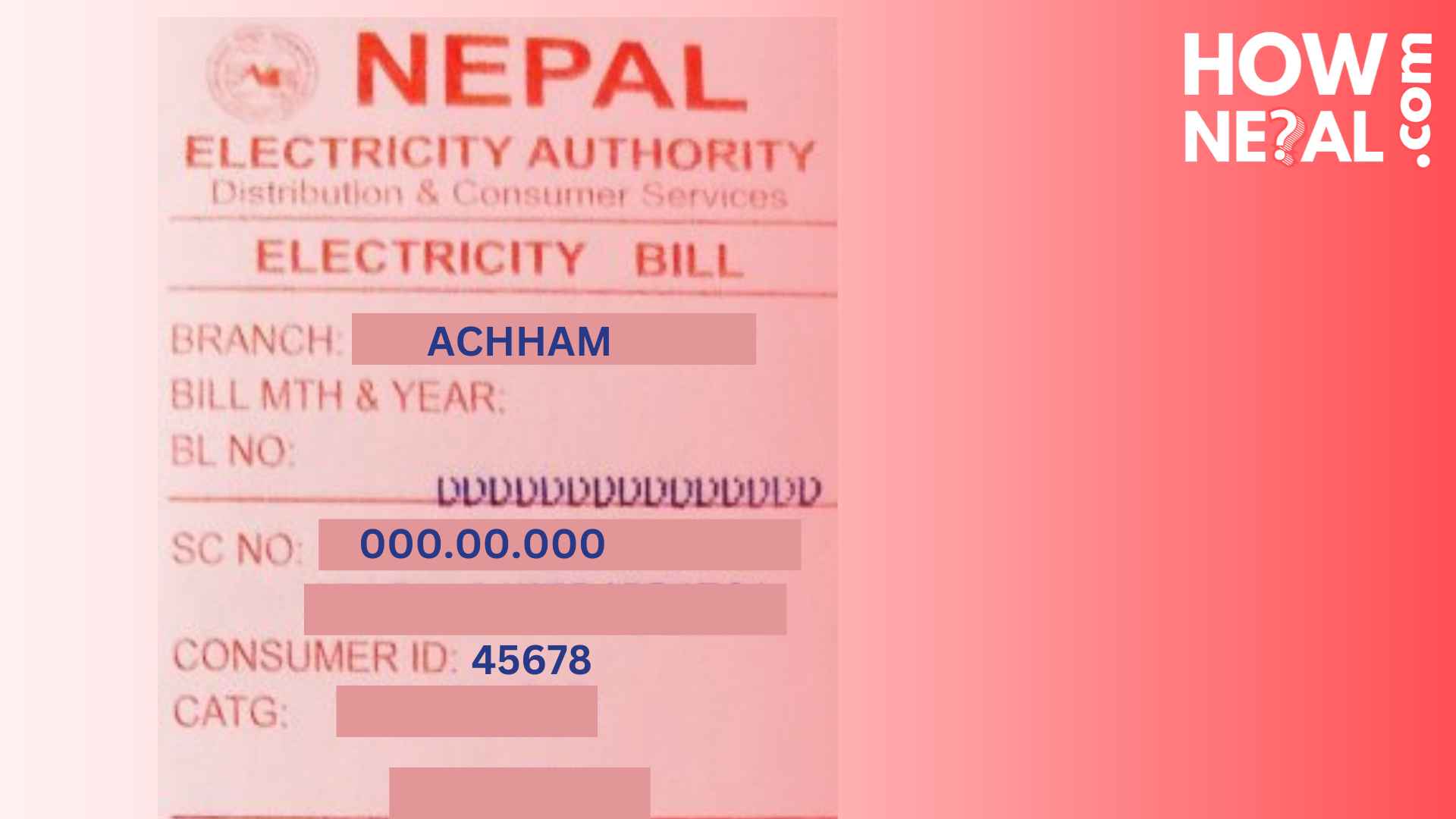
- Branch: This is the name of the office responsible for the distribution of electricity to your home.
- SC No: This is the Service Connection Number, represented as 000.00.000.
- Customer ID: This is a numeric ID, e.g., 4568, found just below your SC No.
If you have all this information, you can also check your bill amount through this NEA website.
Once you've gathered all the necessary details, you're ready to proceed with paying your electricity bill online.
Paying Electricity Bill through Esewa
- Open your Esewa app and log in to your account.
- Locate the "Utility & Bill Payments" section on the home screen.
- Select the "Electricity" option.
- Choose your NEA Counter, which corresponds to the branch on your electricity bill.
- Enter your SC No and Customer ID.
- Proceed to payment.
- You'll see the name of the individual under whom your electricity meter is registered.
- Once you confirm that the details match your electricity bill, you can proceed with the payment.
Note: The service is available between 10:00 AM (GMT + 05:45) and 12:00 midnight (GMT + 05:45) only.
Paying Electricity Bill through Mobile Banking
- Open your mobile banking app and log in to your account.
- Locate "Electricity" under the "Online Payments" option on the home screen.
- Select your counter name, enter the SC No and Customer ID, then proceed.
- Verify that all the details match your electricity bill.
- Complete the payment.
Paying Electricity Bill through Other Mobile Wallets
The steps for paying your electricity bill are quite similar across most mobile wallets available in Nepal, such as Khalti, IME Pay, and others. Just follow the same basic process: log in, navigate to the electricity payment section, enter your SC No, Customer ID, and branch, and confirm the details before proceeding to payment.
FAQs about Electricity Bill in Nepal
- What information do I need to pay my electricity bill online?
You’ll need three key pieces of information: the branch (your NEA office), your Service Connection Number (SC No), and your Customer ID. These can all be found on your electricity bill.
- Can I check my electricity bill amount online?
Yes, you can check your electricity bill amount by visiting NEA's online bill check page.
- What are the service hours for paying the electricity bill online?
You can pay your electricity bill online between 10:00 AM and 12:00 midnight (GMT + 05:45) using services like Esewa or mobile banking.
- What does SC No mean in an electricity bill?
The SC No, or Service Connection Number, is a unique identifier assigned to your electricity connection. It is typically represented in the format 000.00.000 and is found on your electricity bill. You'll need this number when paying your bill online.
- Is it safe to pay the electricity bill through Esewa or mobile wallets?
Yes, it is completely safe to pay your electricity bill through Esewa, Khalti, IME Pay, or any mobile banking app, as these platforms are secure and regulated.
- Can I pay my electricity bill through Khalti or IME Pay?
Yes, the process for paying your electricity bill through Khalti, IME Pay, and other mobile wallets is very similar to Esewa. Simply follow the steps to locate the electricity payment section and input your SC No, Customer ID, and branch.
- Can I pay the electricity bill after the due date through online methods?
Yes, most online platforms allow you to pay your electricity bill after the due date, but late payment charges might apply. Always check your bill to ensure you are within the payment period.
Conclusion
In Nepal, paying your electricity bill is now easier than ever thanks to online platforms like Esewa, mobile banking apps, and other mobile wallets. You can pay your account from the convenience of your home with a few taps, saving you the trouble of waiting in line. Make sure you have all the information you need on hand to ensure a quick and easy experience, whether you use a banking app or a mobile wallet.