Telecommunication /
Views: 2804
Last Updated: February 1, 2025
how to check your phones MDMS status online in Nepal?
The Mobile Device Management System (MDMS) in Nepal is designed to ensure that only legal and registered mobile phones can function on Nepali networks. With the Nepal Telecommunications Authority (NTA) enforcing the MDMS requirement, it's crucial to check your phone’s MDMS status, particularly for imported or newly acquired devices. Mobile devices brought from abroad for personal use and cleared through customs will be automatically registered in the MDMS system. Here’s how you can verify your phone's MDMS status in Nepal in 2024.
Why MDMS is important?
The MDMS system helps:
- Prevent Illegal Imports: Ensures only phones with customs clearance can operate in Nepal.
- Stop Stolen Phones: Blocks stolen phones from being used.
- Verify Legitimacy: Confirms your phone is registered with NTA.
Requirements necessary to check your MDMI status in Nepal :
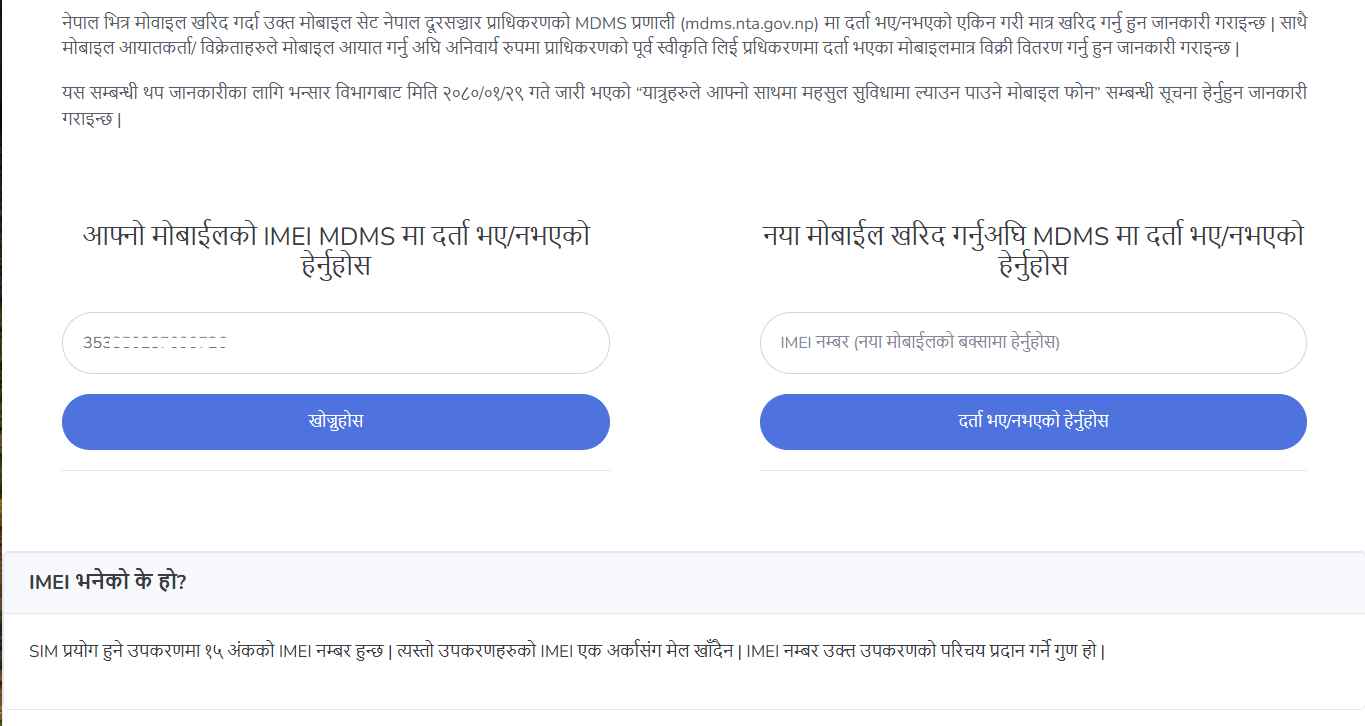
IMEI Number : If you want to check whether your purchased phone is registered in NTA, you can dial *#06# on your phone ang get your IMEI number
If you want to check whether the phone you are going to purchase is registered in NTA, you can check the IMEI inside the phone box.

Steps to check your phone's IMEI status:
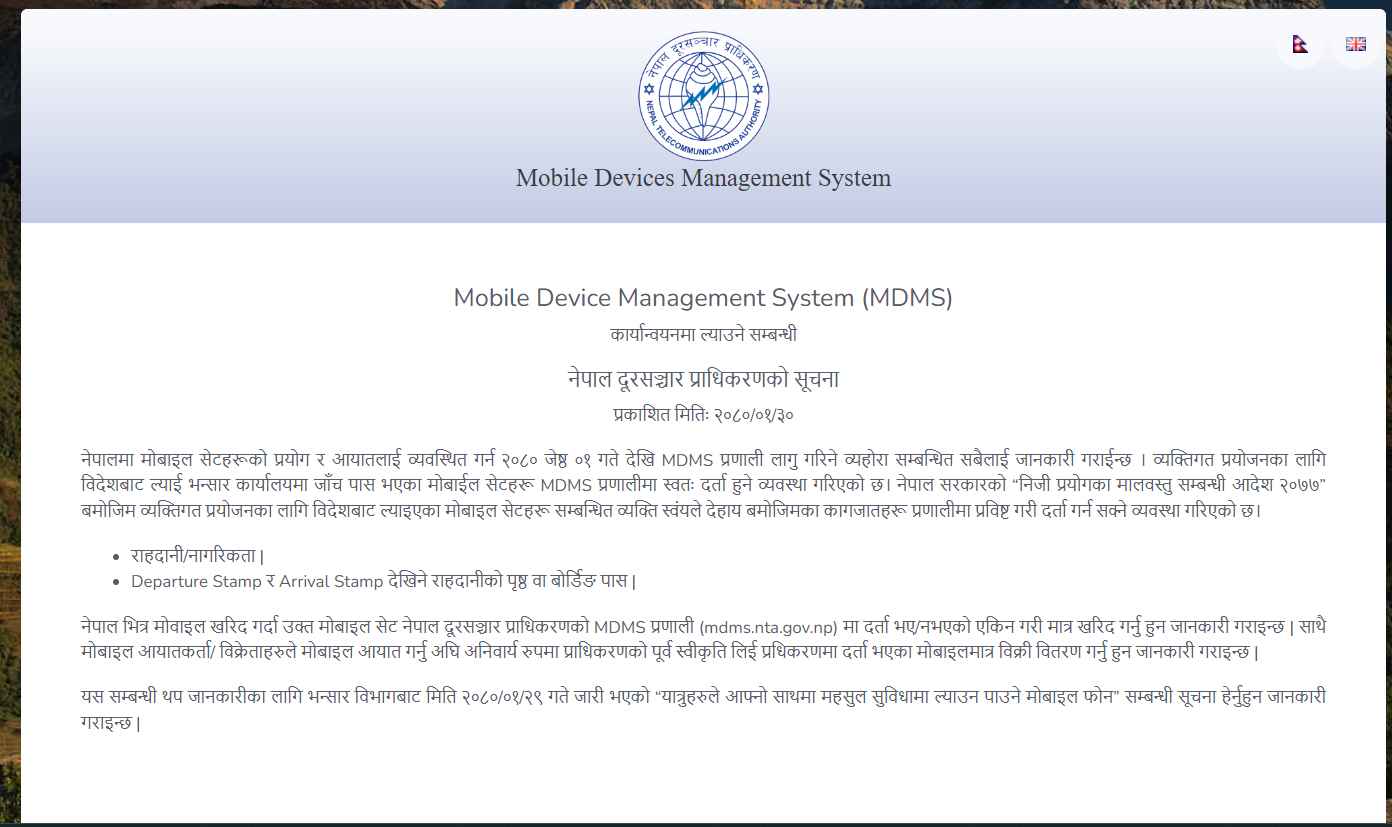
Step 1 : Go to the official website of Nepal Telecom Authority(NTA) MDMS System
Step 2 : In the home page, you can enter your device's IMEI Number in the first input field
Step 3 : Click on the search button and wait for response
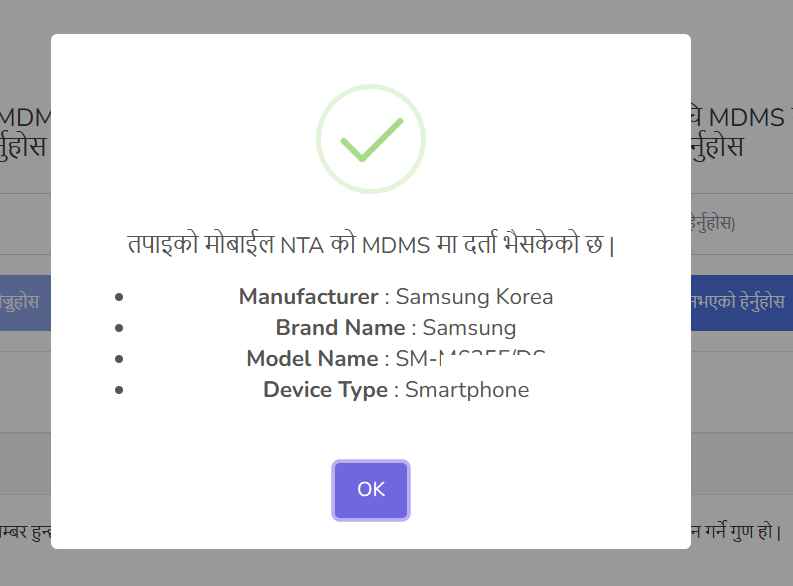
Step 4 : If your phone is registered in the MDMS, You will be able to see your phone's following details
Manufacturer : The name of the company or organization that produced your device. E.g. Samsung
Brand Name : The specific branding or series under which your device was marketed. E.g. Galaxy
Model Name : The unique identifier for the particular model of your phone. E.g. Galaxy S21 Ultra
Device Type : The category of the device based on its intended use or functionality. E.g.. Smartphone
If your phone is not registered in MDMS, you will receive not registered message and you will be prompted with registration link
Step 5 : If you are not registered for MDMS , register into the MDMS system
Frequently Asked Questions
1. What is MDMS, and why is it necessary in Nepal?
MDMS (Mobile Device Management System) is a system implemented by the Nepal Telecommunications Authority (NTA) to ensure only legal and registered mobile phones operate on Nepali networks. It helps combat illegal imports, prevent the use of stolen phones, and verify device legitimacy.
2. How do I check if my phone is registered in the MDMS?
You can check your phone’s MDMS status by visiting the MDMS portal and use your IMEI number.
3. What documents are required to register a phone brought from abroad?
If your phone was not automatically registered, you’ll need:
- Passport showing departure and arrival stamps
- Proof of purchase or customs clearance documentation
4. What happens if my phone is not registered in the MDMS?
If your phone is not registered, it may not support Nepali SIM cards, restricting its use. You must register your phone through the MDMS portal.
5. How can I register a phone that is not automatically added to MDMS?
Visit the MDMS portal, provide the necessary details (IMEI number, passport information, customs clearance proof, etc.), and complete the registration process.
6. Can I check the MDMS status before purchasing a phone in Nepal?
Yes, you can. Check the IMEI number printed on the phone box or the device itself and verify its registration on the MDMS portal.
Ensuring your phone complies with Nepal's MDMS system is essential to avoid network issues and stay within the legal framework. By following the steps and tips outlined above, you can easily check your phone's MDMS status or register it if necessary. Stay informed and ensure hassle-free connectivity with Nepali networks with HowNepal.com.